🖥️ Why bother?
Automating DNS record creation sounds fancy, sounds cool even, but what does it actually get you?
When you’re running a Kubernetes cluster, one of the tools you really can’t do without is the ingress controller. It acts as a reverse proxy, which means it’s the one deciding where incoming HTTP/S traffic actually goes.
  graph LR
    subgraph DNS Entries
        A1[one.example.org]
        A2[two.example.org]
        A3[three.example.org]
    end

    RP[Reverse Proxy]

    subgraph Backends
        S1[Server One]
        S2[Server Two]
        S3[Server Three]
    end

    A1 --> RP
    A2 --> RP
    A3 --> RP

    RP --> S1
    RP --> S2
    RP --> S3
Ok, so if my reverse proxy already redirects traffic to the right application based on the DNS entry, why not just use a wildcard?
Great question! And it happens to have a pretty simple answer: security and granular control.
| Criteria | Wildcard DNS | Automatic DNS record creation |
|---|---|---|
| Setup simplicity | Very simple, one entry covers everything | Requires a system to create each entry individually |
| Granular control | Low, every subdomain points to the same place | High, each subdomain is precisely defined |
| Security | Risk of subdomain takeover and loss of control | Lower risk, each entry is deliberately created |
| SSL certificate management | A wildcard certificate is often needed | Individual or automated certificates (e.g. Let’s Encrypt) |
| Flexibility | Low, hard to route subdomains differently | Very flexible, each subdomain can be routed to a different service |
| Error detection | Trickier, misspelled subdomains can still get a response | Easier, a missing entry signals an error or an invalid subdomain |
| Maintenance | Low maintenance required | Requires a system to manage and clean up entries |
| Scalability | Very scalable (one record covers everything) | Potentially less scalable, depends on the automation solution |
In my case, I want to cut down on unnecessary requests and shrink my attack surface.
See, when you pair a wildcard DNS entry with an Ingress Controller like the Nginx Ingress Controller or even a Gateway API, if no service is routed for one.example.org, say,
the controller still answers! Which needlessly widens your attack surface and can generate extra requests from bots or malicious actors.
🔧 The setup:
- A Kubernetes cluster: here, the one I run for Retake.
- A domain name:
retake.fr - Cloudflare: as the DNS provider.
- Ingress Nginx Controller: as the Ingress Controller
- External DNS: the magic tool that manages entries automatically
⚙️ Setting it up:
Alright, let’s get into it.
First off, I want to point out that External DNS supports every one of the following DNS providers:
- Google Cloud DNS
- AWS Route 53
- AWS Cloud Map
- AzureDNS
- Civo
- CloudFlare
- DigitalOcean
- DNSimple
- PowerDNS
- CoreDNS
- Exoscale
- Oracle Cloud Infrastructure DNS
- Linode DNS
- RFC2136
- NS1
- TransIP
- OVHcloud
- Scaleway
- Akamai Edge DNS
- GoDaddy
- Gandi
- IBM Cloud DNS
- Plural
- Pi-hole
- Alibaba Cloud DNS
P.S. This list comes straight from the official docs
I’ve been working exclusively with Cloudflare for two years now. It’s fast, it’s free, the API is genuinely intuitive, and the free-tier features cover pretty much everything you’d want.
Once you’re logged into your Cloudflare account, head to Profile > API Token and create a token with the following configuration:
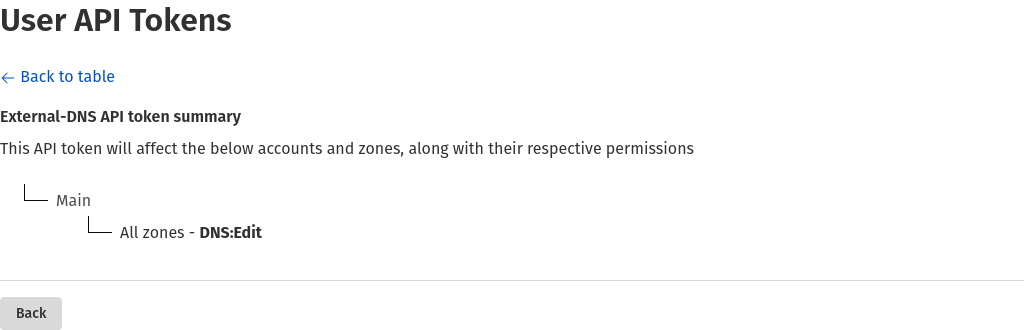
Save it and set it aside for now.
Now it’s time to deploy External DNS:
First, create a namespace:
kubectl create namespace external-dns
Create a secret:
kubectl create secret -n external-dns generic cloudflare-api-key --from-literal=apiKey=<API_KEY> --from-literal=email=<EMAIL>
Add the helm repository:
helm repo add external-dns https://kubernetes-sigs.github.io/external-dns/
helm repo update
Prepare your values:
# values.yml
provider:
  name: cloudflare
env:
  - name: CF_API_KEY
    valueFrom:
      secretKeyRef:
        name: cloudflare-api-key
        key: apiKey
  - name: CF_API_EMAIL
    valueFrom:
      secretKeyRef:
        name: cloudflare-api-key
        key: email
And install it:
helm upgrade --install external-dns external-dns/external-dns --values values.yml -n external-dns
🎉 Using it
Now that everything’s in place, we could just create our ingresses and call it a day, right?
Wrong. Completely wrong.
External DNS was designed the way most official Kubernetes projects are, meaning it’s built to work primarily on top of a cloud provider. So yes, if you create an ingress on your cluster, a DNS entry does get created, but as an A record pointing to the external IP attached to your Ingress Controller. In my case:
AME                                         TYPE           CLUSTER-IP     EXTERNAL-IP   PORT(S)                      AGE
service/ingress-nginx-controller             LoadBalancer   10.43.244.24   10.2.1.1      80:32553/TCP,443:32066/TCP   384d
But since 10.2.1.1 is a local IP assigned by Cilium, the HTTP/S requests hitting the A record that External DNS created just go nowhere.
So we need to force External DNS to create our DNS entries pointing at our public IP instead.
Here’s an example:
# whoami.yml
apiVersion: networking.k8s.io/v1
kind: Ingress
metadata:
    name: whoami
    namespace: whoami
    annotations:
        external-dns.alpha.kubernetes.io/target: <IP Publique>
        cert-manager.io/cluster-issuer: letsencrypt
spec:
    tls:
        - hosts:
            - whoami.retake.fr
          secretName: whoami-cert-tls
    ingressClassName: nginx
    rules:
        - host: whoami.retake.fr
          http:
            paths:
                - path: /
                  pathType: Prefix
                  backend:
                    service:
                        name: whoami-svc
                        port:
                            number: 80
Apply it:
kubectl apply -f whoami.yml
Check the Cloudflare dashboard:


And confirm it with a curl:
curl http://whoami.retake.fr
IP: 127.0.0.1
IP: ::1
IP: [REDACTED]
IP: [REDACTED]::1026
IP: [REDACTED]:5866
RemoteAddr: [REDACTED]:56290
GET / HTTP/1.1
Host: whoami.retake.fr
User-Agent: curl/[REDACTED]
Accept: */*
X-Forwarded-For: [REDACTED]
X-Forwarded-Host: whoami.retake.fr
X-Forwarded-Port: 80
X-Forwarded-Proto: http
X-Forwarded-Scheme: http
X-Real-Ip: [REDACTED]
X-Request-Id: [REDACTED]
X-Scheme: http
And there it is! Automatic DNS record creation, working exactly as intended.
📚 Terminology
| Term | Definition |
|---|---|
| Ingress Controller | Kubernetes component that handles HTTP/S routing to internal services |
| Reverse Proxy | Intermediate server that forwards incoming requests to the right backend services |
| Wildcard DNS | A DNS entry of the form *.example.org that catches every subdomain |
| DNS Entry (Record) | A record in a DNS zone (type A, CNAME, TXT, etc.) that maps a domain name to an IP or other info |
| External DNS | Kubernetes controller that syncs resources (Ingress, Service, etc.) with an external DNS provider |
| Annotation | Kubernetes metadata attached to a resource to influence its behavior |
| Cert-manager | Tool for automating SSL/TLS certificate management in Kubernetes |
✅ Conclusion
In not much time at all, we’ve seen how to add a layer of automation and security by having External-DNS and Cloudflare create our DNS entries for us. Writing this little article also had me stumble into and untangle a fairly unexpected problem, one I’ll get into in another post, which has to do with yet another way of securing your infrastructure…