🎯 Why This Project?
At first, I thought the Hailo‑8L was some kind of magic chip — the kind where you could run LLMs, use it as a backend device for frameworks like Tensorflow, train models on it, all of it.
Spoiler: absolutely not.
Digging in a bit, I understood that the Hailo‑8L is built exclusively for inference, not training, and definitely not [Reinforcement Learning] or any kind of LLM business.
It’s an ultra-efficient chip, but a specialized one, designed to run already-trained models on embedded systems — cameras, robots, edge devices, that sort of thing.
So I tried out Hailo’s pre-existing models, and it turned out to be almost exclusively computer vision stuff: image classification, object detection, segmentation, and so on.
Except honestly, I couldn’t care less about that. What I actually wanted was to write my own AI model, understand what’s happening under the hood, and get it running on my own hardware.
So I decided to start from scratch with MNIST, deep learning’s “Hello World” dataset. My goal:
- Build my very first model from A to Z
- Get it running locally on the Hailo‑8L
- Understand the entire chain end to end
If you want to poke through the full code, it’s all up 👉 here.
🔧 My Setup (Hardware + Software)
🧱 On the Hardware Side
I’m using a Raspberry Pi 5, for the simple reason that it’s the only Pi compatible with the Hailo‑8L NPU.
Why? Because the Hailo‑8L connects over PCIe, and the Pi 5 is the only one that exposes a real, easily accessible PCIe lane.
The NPU plugs in via a PCIe x1 ribbon board. It’s all explained in the Raspberry Pi docs, which I followed to install the packages on the Raspberry Pi side.

💻 On the Software Side
On the Pi:
- Installed the Hailo packages (SDK + runtime) so I could actually run models
- Used HailoRT to load the model onto the NPU and kick off inference
But compiling the model is where things get a bit more involved:
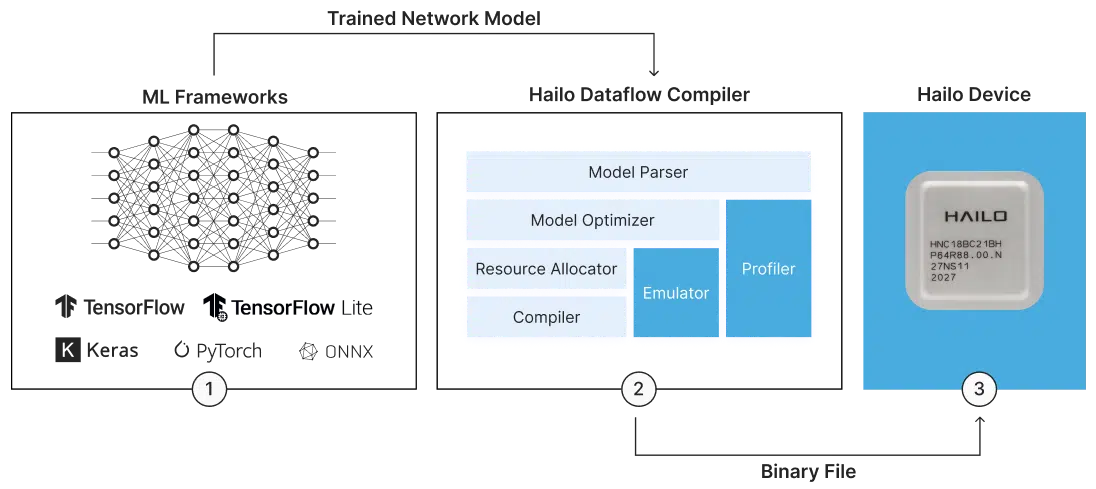
The Hailo Dataflow Compiler (DFC), which converts a TensorFlow or ONNX model into a .hef executable for the NPU, only runs on x86_64 and is only available as closed-source software from the Hailo Developper Zone.
So I set everything up on my personal PC (running Pop OS), and that’s where I trained, exported, and quantized my model.
🤔 A Small Discovery Along the Way
At first I didn’t understand their specs at all: they kept talking about “26 TOPS,” never TFLOPS, and I couldn’t figure out what was going on.
Turns out it’s because the Hailo‑8L doesn’t do floating point at all. It works exclusively in INT8 (8-bit integers), which explains why it’s both so fast and so power-efficient.
So if you want your model to run on it, you have to quantize it from float16 down to int8 using the DFC — otherwise it’s a non-starter.
⚙️ The Main Steps of the Project
1️⃣ Training the MNIST Model
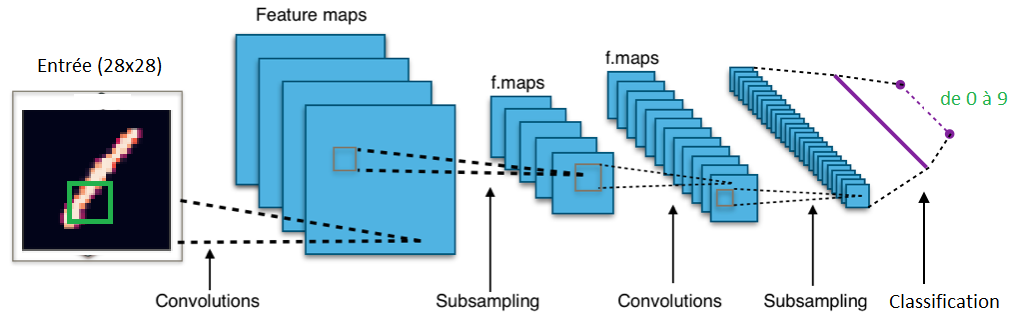
I started by building a simple, stable, functional model and training it on the classic MNIST dataset — handwritten digits.
For that I used Keras, because it’s simple and efficient for prototyping fast.
2️⃣ Exporting the Model
Once it was trained, I had to figure out which format I could export it in so I could later convert it using the Hailo tools.
I looked into a few formats:
.keras(Keras’ native format).tflite(TensorFlow Lite, commonly used for embedded targets).onnx(Open Neural Network Exchange), which is the most common format and is supported by most frameworks and tools, so that’s the one I went with.
3️⃣ Discovering and Getting to Grips With the Hailo DFC
Next, I got familiar with Hailo’s Dataflow Compiler (DFC).
This tool takes the .onnx or .tflite file and compiles it into a proprietary .hef format optimized for the Hailo NPU.
On top of that, it also handles the INT8 quantization that’s mandatory for this hardware.
4️⃣ Compiling and Deploying on the Raspberry Pi
With my .hef file in hand, I transferred everything over to my Raspberry Pi 5, NPU and all.
Thanks to the HailoRT runtime, I was able to run inference directly on the chip and confirm everything worked.
It’s a bit geeky to admit, but watching your own model run on an embedded chip is genuinely a rush! 😎
💡 What I Learned / Key Takeaways
One really important thing to understand about NPUs — whether it’s the Hailo‑8L, the Google Edge TPU Coral, or anything else in that family — is that they don’t do training.
They’re chips dedicated purely to inference, meaning they run models that have already been trained, in a highly optimized, low-power mode.
So the workflow always looks like:
- First, train your model on a regular PC or server, GPUs and all
- Then compile that model with a specialized tool (like Hailo’s Dataflow Compiler) to produce an executable file compatible with the chip
- Then deploy that compiled file onto the chip to run inference in real time
If you’re expecting to do training directly on an NPU, you’re going to waste your time. These chips are built to deploy ML at lightning speed, not to learn from new data.
📎 Useful Links
- Full repo (code + detailed walkthrough): github.com/l-nmch/hailo-mnist
- Hailo SDK: hailo.ai
- Hailo forum (very useful!): community.hailo.ai
🧠 Terminology
| Term | Quick Definition |
|---|---|
| NPU (Neural Processing Unit) | A specialized processor for running AI models quickly, particularly neural networks. Optimized for inference. |
| Inference | The stage where an already-trained model is used to make predictions (e.g. recognizing a digit). |
| Training | The phase where the model learns from data. Usually requires a lot of resources (GPU/TPU). |
| INT8 | An 8-bit integer number format. Less precise than float32, but faster and lighter for NPUs. |
| Quantization | The process of converting a model trained in float32/float16 into INT8 so it can run on specialized hardware. |
| TOPS (Tera-Operations Per Second) | A performance unit for AI chips. Different from TFLOPS, since it’s typically used for INT8 operations. |
| ONNX (Open Neural Network Exchange) | An open-source AI model format, compatible with multiple frameworks (TensorFlow, PyTorch, etc). |
| .hef | Hailo’s proprietary compiled format for its NPUs. Generated by the Dataflow Compiler. |
| HailoRT | The runtime provided by Hailo to load a .hef file onto the NPU and run inference. |
| Dataflow Compiler (DFC) | Hailo’s tool (x86_64 PC only) for compiling and quantizing models into the .hef format. |
✅ Conclusion
I hope this little adventure made you want to try edge AI for yourself.
If you’ve got a Hailo‑8L or some other NPU lying around, honestly, just go for it.
And if you want to grab my code to try it out, go for it — it’s open-source 💡